
In my previous post, I mentioned that I tend to think about stories at the scene level. I even write chronologically, scene-by-scene. I visualize the overall story structure on a much broader scale, but I try to stay focused on individual scenes as I write, staying “in the moment”. This helps my third-person limited point of views stay immersive, and it’s a technique common as dirt among writers. It’s mundane advice at best, but it’s just another one of those things that works for me.
So yes, writing scene-by-scene is a simple concept, but here’s where things get interesting: I brought this concept to the next level by writing stories almost as if they were code. That might have you scratching your head, but allow me to explain:
Instead of naming the program, we start with a book title. Instead of writing functions, we’re writing scenes. And just like how a program won’t function without all the functions, your book isn’t done without all the scenes.
It’s kind of like using an organizational outline-based word processor like Scrivener, but my method is far more flexible, less fiddly about the order of operations, and doesn’t have much of a learning curve.
Maybe you could imagine how the pseudo-code (ie: mark-up language) of a book might look as it takes shape:
Novel – Five Rings
{
Chapter 1: The Thief-Who-Is-Not-a-Thief {}
Chapter 2: The Fence and the Horse {}
Chapter 3: Stars {}
Chapter 4: The Order of the Red Hand {}
Chapter 5: The Pillar {}
Chapter 6: The City Aflame {}
Chapter 7: Assassin {}
Chapter 8: The Trouble with Fate {
scene: MC clashes with Murelana {}
scene: MC escapes to the rooftops {}
scene: MC fights off guards {}
scene: MC is wounded by Cyronil {}
scene: MC vs. one-eyed guard
{
        The one-eyed guardswoman stood balanced against her upright spear.
        He somehow knew this encounter would happen. Grianai favored cruel irony. It was how he toyed with non-believers. Cirellio, body shaking, assumed his stance, his longsword slung over his right shoulder, his knife in a reverse grip. ...(etc.)
}
}
The novel is expanded. We have just eight chapters in this example to keep things simple, seven of which are collapsed. But the eighth is expanded, revealing the scenes within.
The fifth scene of the scene-heavy chapter eight, which (for my own reference) I call “Main Character versus one-eyed guard”, is expanded, showing the actual scene.
So that’s the general idea. Each scene, and even the book itself can be collapsed and expanded at will. Being able to collapse down to the chapter level gives you a nice overview of your story. Collapsing down to the scene level gives you a detailed outline of your story, and can really help you put your story into perspective without getting overwhelmed by a sea of 30,000+ words.
Expanding a scene shows me the individual scene. I can also shoehorn other goodies in there, such as “scraps” (stuff I wrote for the scene but didn’t use), notes (such as notes about how I expect the scene to go, how the scenery might look, etc.), brainstorming sessions (such as a Q&A with myself about the scene), hanging questions about the scene (what I don’t yet know, but hope to figure out through discovery writing), concerns I may have about the scene both before and after I write it, etc.

Pictured is my main fantasy novel in Notepad++, completely collapsed. There’s something tranquil, simple, and complete about a collapsed novel that calms my nerves. It makes the project seem so … compartmentalized … and do-able. Before we proceed, keep in mind Notepad++ is not meant to be a word processor, not by a long shot. And it’s certainly not designed for writing a novel. It’s more geared toward coders who know coding languages such as C++ or Java.
But what I love about this program is its ability to collapse and expand different sections, right down to the scene.
If I click the little + sign to expand the book title…
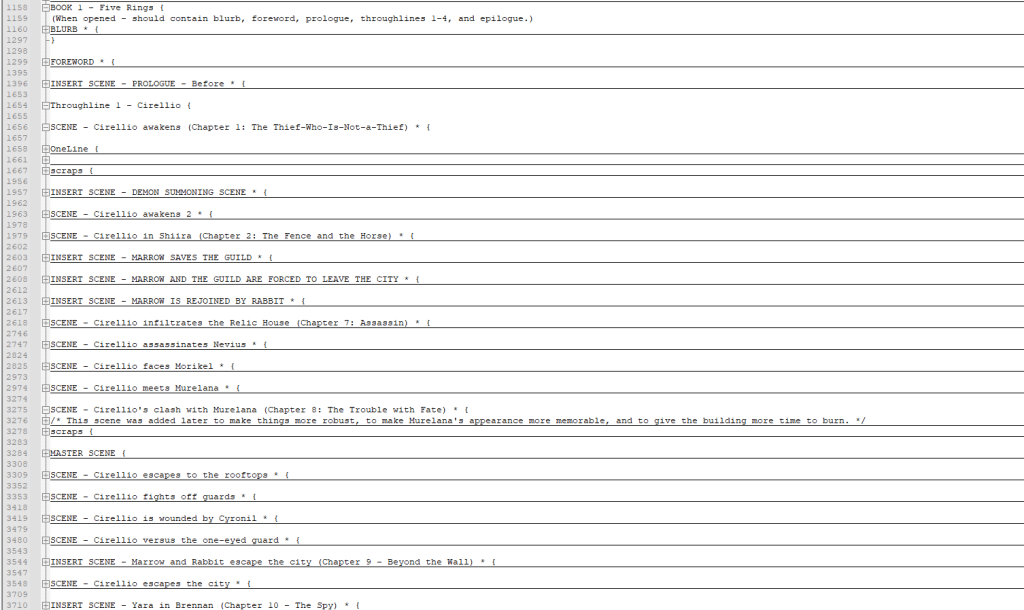
Your brain is probably doing one of two things right now. It’s either thinking, “What a mess!”, or it’s thinking, “So simple and organized!”
I suppose that all depends on how your brain processes writing a novel. Needless to say, my brain really likes this style of organization.
There are a lot more collapsibles as well. The blurb’s here, the foreword, the prologue (Yes, there’s a prologue, but don’t worry, it’s not one of THOSE prologues. Plus, I have plans for it I’ve never seen any other writer attempt before.)
And then I have four throughlines. Three for the main POV characters, and a fourth for miscellaneous POVs.
Keeping these grouped by throughline has helped me keep each character voice consistent, and helps ensure I’m building a satisfying character arc for each character while following up on promises made.
Anywhere it says INSERT SCENE is a scene that was already written in a different throughline, but will be placed in that spot in the final book. I only do scene inserts for the first throughline, which is the throughline for the main character. This is to help me visualize how all the scenes in the final novel will line up, and this method also allows me to rearrange scenes at will.
An asterisk indicates that particular section has already been written.
I also denote where each chapter begins and ends in the first throughline, giving me a complete map of the book’s final structure.
To start writing a novel like this, one would obviously need an outline (so it’s not very pantser-friendly). Once every part of an outline is represented in the structure, it’s possible to add or remove scenes as needed, which lets the outline evolve through discovery writing.
Once every scene has an asterisk on it, the book title itself gets an asterisk, indicating the book is done.
I don’t do this for every project, but it helps me keep my largest projects organized and manageable.
I even created my own custom language called “Novel”. Notepad++ makes this very easy to do, but it’s an optional step.
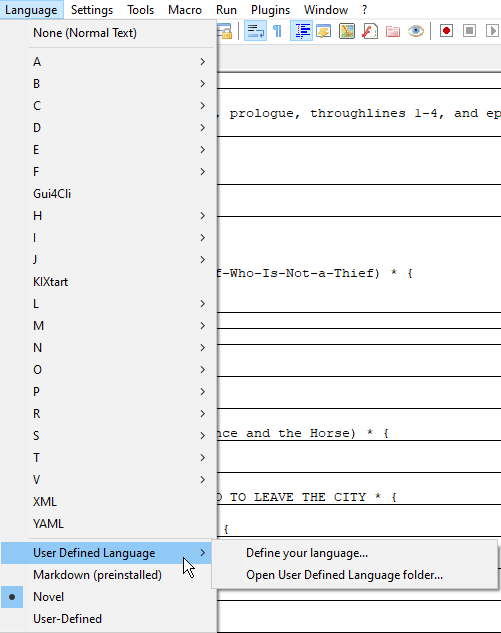
The main drawback to using Notepad++ is that it sometimes gets confused on how to collapse and expand sections. For example, sometimes collapsing the book leaves a few chapters out, while other times, it collapses the entire book with all chapters included. (This can make you go nuts, deleting and adding unnecessary brackets to force it to behave.)
I need to figure out a better, more consistent program to use that can do something similar, and I am open to suggestions. Notepad++ was also once blasted for having a backdoor built into it for spying purposes (despite being open source), although the offending malicious code has since been removed. But it has made me dubious toward the program ever since.
At any rate, collapsing scenes is a trick in my toolbelt that has worked very well for me, and yet another “something” that could only come from learning what works and what doesn’t through the trials and errors of writing.
 Nick Enlowe
2 thoughts on “Figuring Out What Works: Collapsible Scenes”