
Given the numerous problems I’ve had organizing my writing notes in the past, I’ve been searching high-and-low for a solution for many years, hoping I’d eventually stumble upon an organizational program that works for me.
I’ve tried OneNote, Scrivener, mind-mapping programs, notecard programs, plotting programs, Post-It note-style programs, etc. and ran into many problems, including:
- Huge learning curve (such as having to learn a special scripting language just to use)
- Subscription-based (have to pay to keep using it–Too many programs are like this now!)
- Online-only
- Offline, but requires online registration
- Web-based only (can only use in a web browser)
- Proprietary file format (ie: files cannot be opened with a plain text editor)
- Not fast and simple enough for note-taking
- No easy drag-and-drop interface
- Designed more as an “app” than a desktop program
- Only accepts stylus input
- Prohibitively costly one-time fee
- Too many collaboration features cluttering up the program that I have no interest in
Earlier this week, I finally found a piece of note-taking software that solves all these problems.
- installed locally
- saves your writing as plain text or markup language (file corruption is highly unlikely and you can open your files with Notepad in a pinch)
- housed within a normal program designed for Windows (not just an app or web app)
- free and easy-to-use
- open-source
- while you can create a sign-in (to synchronize your saves to OneDrive), you don’t have to
You can literally install this sucker for free and get going with it right away without ever having to deal with any nonsense such as registration, or much of anything else.
And that program is Joplin.
Here’s what it looks like in action:
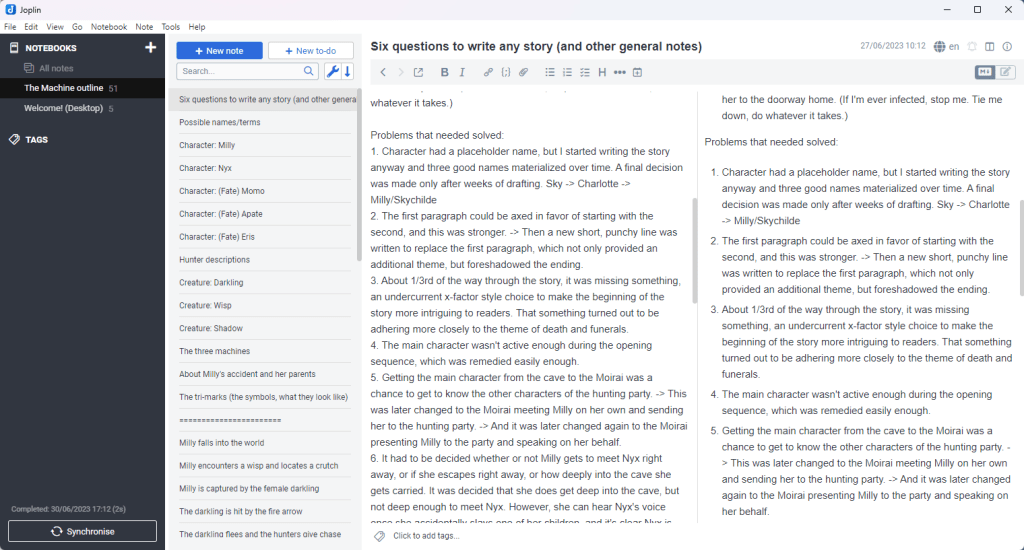
You just create a new notebook by clicking the + sign (in the upper left), then click new note (as needed), and type new notes or cut/paste old ones.
Couldn’t be simpler.
Once you have several notes in your notebook, you may want to also do this one last thing:
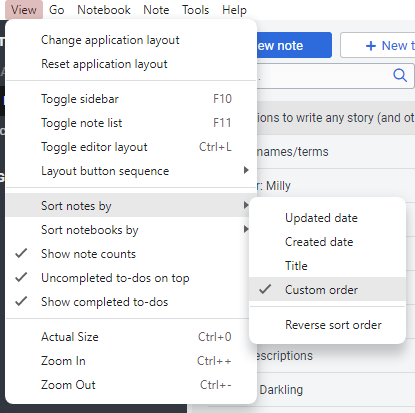
The “Custom order” option lets you drag and drop your note cards in whatever order you want.
And that’s about it.
My only gripe with this software is there’s no manual File-> Save option, but it saves every 2 seconds anyway, and I haven’t lost anything (yet–fingers crossed).
All that searching and testing just to find a straightforward and simple note-taking program. Sigh.
Joplin’s so self-explanatory, I’ll spare you the process I go through to cut/paste my notes in here. The screenshot alone should say it all.
I’m just glad I finally found what I was looking for.
 Nick Enlowe
3 thoughts on “My Writing Notes: Organized At Last!”